Even Realities G2 · Built by a guitarist
Working out a song
shouldn't be this much work
Learning a song always starts with the key: trial and error, a chart that may be wrong, and one bad guess takes every chord with it.
These glasses have a microphone and a display. So let them listen while you play, and put the answer where you are already looking.
Why glasses
Because while you are working a song out, your hands cannot leave the guitar — and your eyes would rather not either.
Before
Find a chart, unsure whether it is right. Play along, discover the key is different. Transpose, move the capo, try again. In between, put the guitar down to tap the phone, scroll, rewind.
The tiring part is not the playing. It is being interrupted to check.
Now
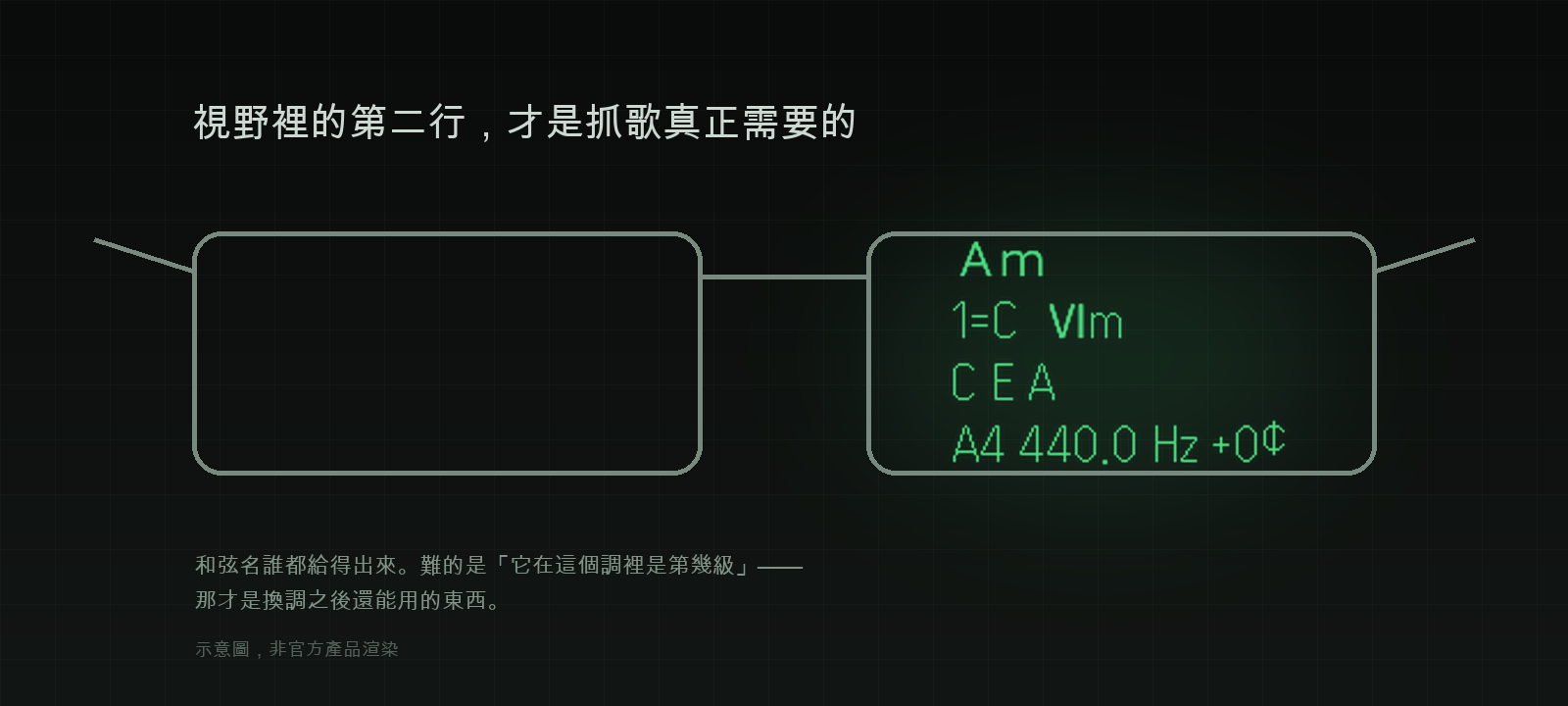
Strum once. 0.13 seconds later the chord name is in your field of view, along with its degree in the current key, the notes it is actually hearing, and the reference pitch your guitar sits at.
Hands stay on the strings. Eyes stay on the guitar.
The line that actually matters is the second one: the degree. Anything can name a chord, but G7 only tells you about this moment; Ⅴ7 tells you what the song is doing.
Degrees transfer, which is the whole point — the same Ⅰ-Ⅴ-Ⅵm-Ⅳ is the same order of shapes in every key and at every capo position. Work it out once, and it holds everywhere.
One screen, four lines
576×288, one shade family of green, no font sizes and no alignment control. Minimal is the requirement, not the style.




Captured from the simulator. The chords, degrees and cents are really computed — only the audio is synthetic.
Three decisions a real instrument forced
None of these are details a general-purpose music app would bother with.
Capo goes both ways
Positive is a capo on the neck. Negative means the whole guitar is tuned down (−1 half step, −2 whole step). On a guitar tuned down a half step, a C shape sounds B — so the first line gives both the chord that comes out and the shape your fingers are holding.
And the tuning offset cannot be heard: tune the whole guitar down and every note still lands exactly on the equal-tempered grid. So it is a setting, not a detection.
You have to listen to the bass
C6 and Am7 are exactly the same four pitch classes. From the pitch-class distribution alone those two chords cannot be separated — the only clue is which note is lowest.
So a second distribution is taken from the bass band (≤250 Hz) and used as a root prior. That case went from 5.6% to 100%, and the column simulating a microphone with weak lows still scores 100%.
While tuning, your eyes are elsewhere
The reading is held for 2.5 seconds after the string decays, with a 2-cent deadband on top, because at that moment you are looking at the tuning peg. Solid ◆ dead centre, hollow ◇ either side — and the needle position and the "in tune" verdict come from the same threshold.
Accuracy is measured
The numbers are printed on the tool page, including the unflattering one.
0.13s
to show a chord change
100%
solo guitar
15 open-position shapes
40.8%
fully produced pop songs
majmin WCSR
0
network requests
This was built for playing an instrument, and that column is 100%. A recording out of a speaker is much harder: scored against a public dataset with human chord annotations aligned to 10 ms (24 tracks, 89 minutes) it reaches 40.8% — meaning it is wrong more of the time than it is right. The denser the arrangement and the louder the vocal, the harder it gets. That sentence is on the tool page too.
Stack
DSP
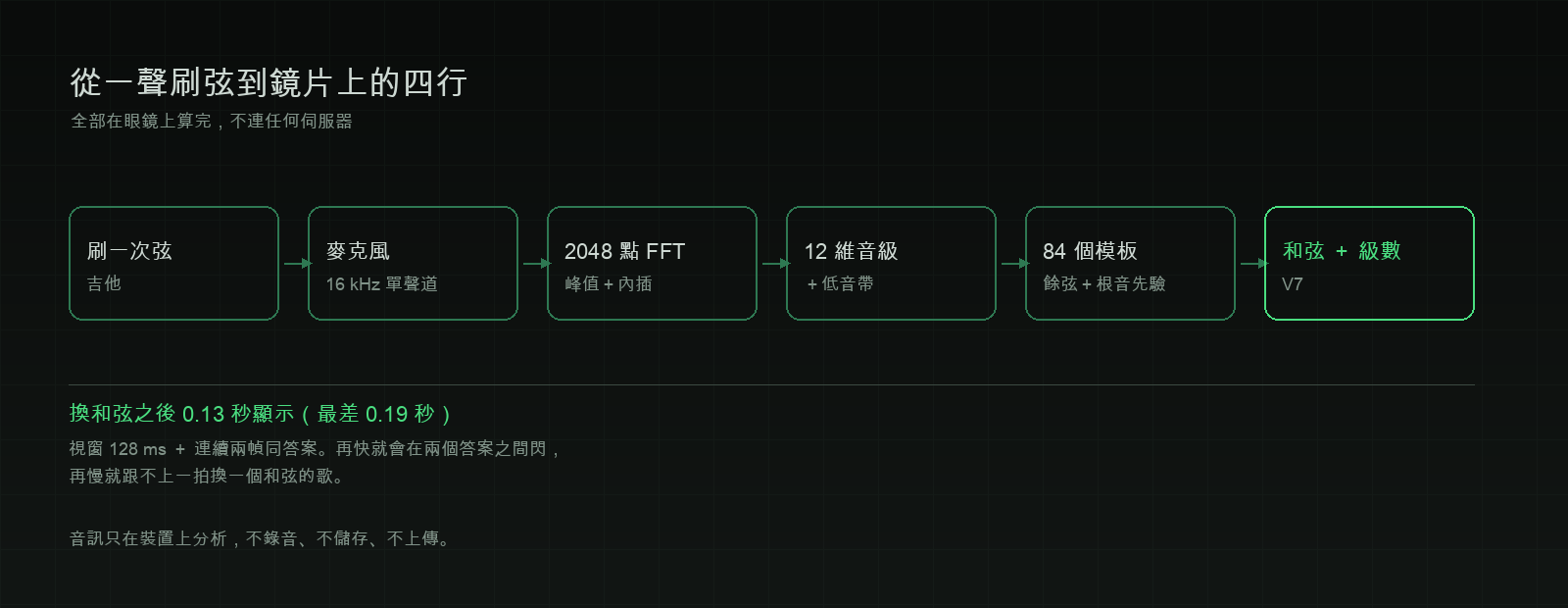
2048-point FFT / hop 512
Spectral peak picking + parabolic interpolation
12-D chroma × 84 chord templates
Pitch
YIN monophonic pipeline
Circular median against outliers
Robust IQR spread flags "unsteady"
Display
576×288, 16 shades of green
@evenrealities/pretext per-glyph metrics
A missing glyph kills the whole line
Verification
2,190 screen states measured
Synthetic sweeps + a public dataset
Every number maps to a script
Audio is analysed on the device. Nothing is recorded, stored or uploaded, and the app makes no network requests. English and Traditional Chinese.