Local AI · DGX Spark
AI Video Studio
Type one description, get one moving picture.
Async generation queue × ComfyUI + LTX-2.3 — all on our own GPU.
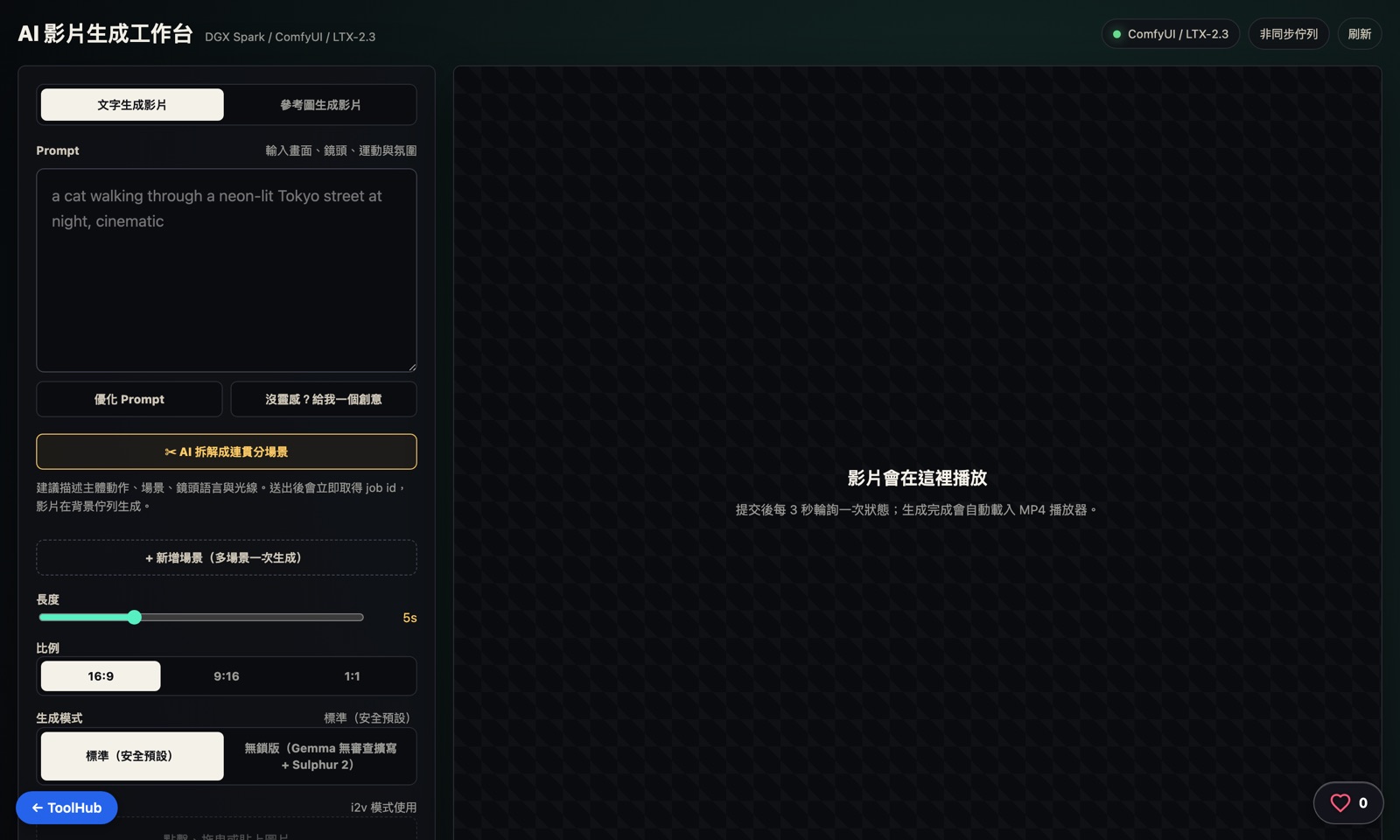
The live interface — captured with Playwright
Why build one
Cloud video generators are fun, but the same old problems apply: your data leaves the building, you pay per second, and you wait for the vendor to add a model. For internal use — demo clips, slide assets — the first one is already a blocker.
The GPU on the DGX Spark has spare cycles between inference jobs, enough to render clip after clip. Wire ComfyUI to an LTX-2.3 model and you get a video studio that is free and never leaves the network.
The real challenge is the wait: a single clip can take minutes to render, and nobody should have to stare at a spinner. Designing the wait itself is where this tool spent most of its effort.
How it works: the journey of one clip
From one description to one moving picture — five things happen in between.
Scene input
Each scene takes a description in Chinese or English. Users can ask the AI to refine the prompt, or just ask the tool for inspiration.
Into the async generation queue
Generation isn't a request-and-wait affair — the job joins a queue, and users can queue the next clip immediately instead of staring at a spinner.
ComfyUI + LTX-2.3, computed locally
The queue feeds jobs one by one into ComfyUI on the DGX Spark, where the LTX-2.3 video model does the actual rendering.
Extension and multi-scene sequencing
A finished clip can be "extended" further, or several scenes can be queued at once and stitched into a complete sequence.
Video output
The finished clip returns to the studio, ready to download or to extend into the next segment.
Deep dive: the LTX-2.3 two-stage node graph
The core is two-stage sampling: roughly 8 steps at half resolution with a distilled LoRA to explore composition and motion, then a latent upscaler doubles it back to full resolution for about 3 refinement steps. Measured 40%–80% faster on the same hardware than running the same step count at full resolution the whole way. Below is the node flow actually executed for text-to-video (t2v).
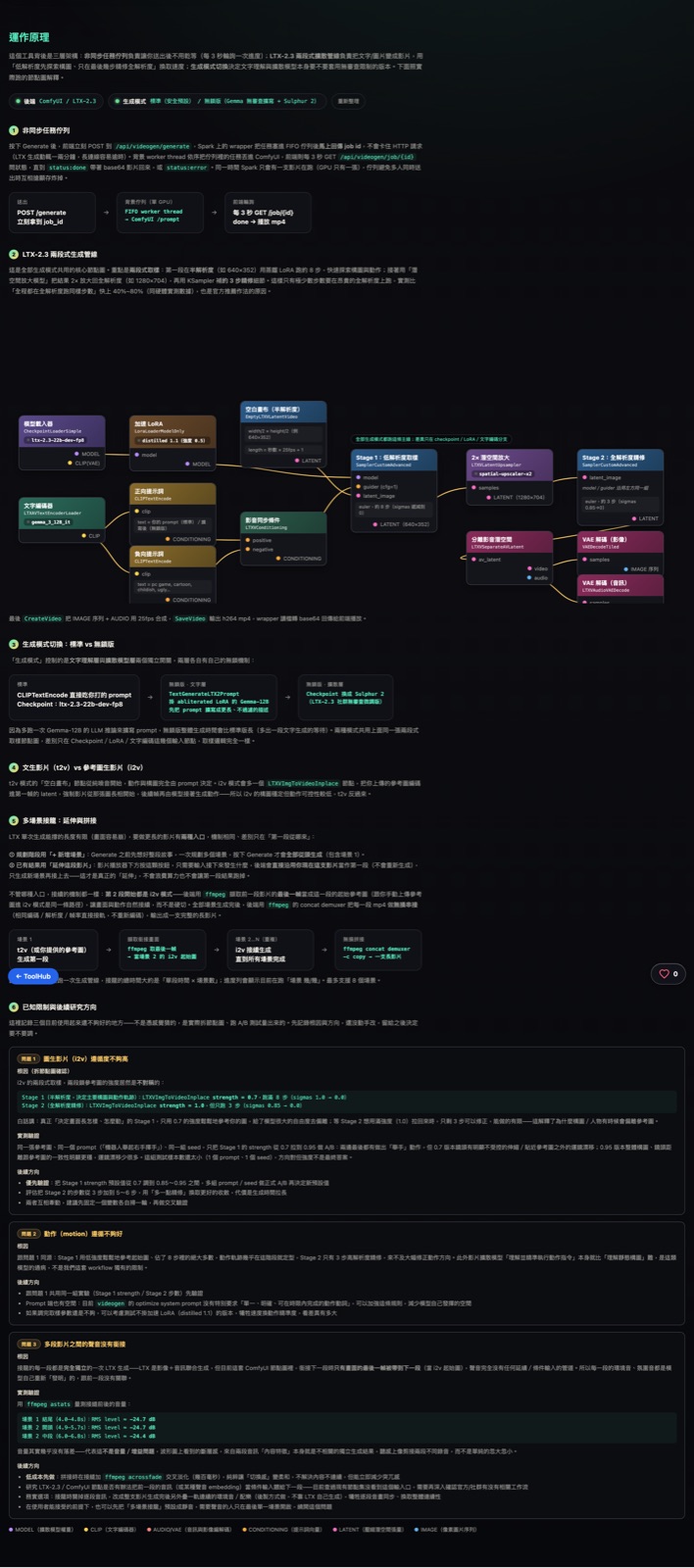
The tool's built-in principle page — real ComfyUI node graph with live model status
The i2v mode inserts an extra LTXVImgToVideoInplace node after the text-encoding branch, encoding the reference image into the first frame's latent; t2v starts from pure noise — i2v keeps composition stable but motion is less controllable.
Async job queue
POST /generate returns a job_id right away → FIFO worker thread (one GPU, one job at a time) → ComfyUI /prompt → the front end polls GET /job/{id} every 3s → done plays the mp4
Multi-scene chaining
Scene 1 renders → ffmpeg grabs the last frame as scene 2's i2v starting image → repeat through scene N → ffmpeg's concat demuxer (-c copy) stitches it all into one long clip losslessly
Field notes from testing
Three known limitations measured by tearing apart the node graph and running A/B tests — not guesses.
Issue 1 · i2v fidelity
The two sampling stages lock onto the reference image asymmetrically: Stage 1 (which decides composition and motion, running the full 8 steps) uses only strength 0.7; Stage 2 goes up to 1.0 but has just 3 steps left to correct. An A/B test raising Stage 1 strength to 0.95 visibly reduced camera drift, though the sample size is still small (1 prompt, 1 seed).
Issue 2 · motion fidelity
Same root cause: the motion trajectory is nearly locked in during the low-strength Stage 1, and Stage 2's 3 high-res steps aren't enough to correct direction. Following motion instructions is also just harder for video diffusion models than following static composition — a common weakness across the whole model family.
Issue 3 · audio doesn't carry across segments
ffmpeg astats at the seam: scene 1 end -24.7dB / scene 2 start -24.7dB / scene 2 mid -24.4dB
Volume barely differs — it's not a gain problem. Each segment is generated independently with unrelated content. Chaining only carries the last frame forward as the i2v seed image; audio has no continuity channel at all.
Key design decisions
An async queue instead of synchronous waiting
Video generation is slow, and making users stare at the screen while it finishes serves no one. Submit, and the job joins the queue — queue the next one, then check back for results.
Multi-scene generation + video extension
The same video can be "extended" forward, or several scenes can be queued at once and stitched into one complete story.
Standard / advanced dual modes
Not every clip needs the most expensive settings. Splitting standard and advanced modes puts compute where it's actually needed.
Local-first, no cloud in the loop
From prompt refinement to the final render, everything runs on the DGX Spark locally — data never leaves the network.
Architecture
Frontend
Sora-style studio
per-scene AI refinement + ideas
docs its own pipeline in-app
Queue
Async generation queue
non-blocking submissions
chain the next clip freely
Inference
ComfyUI on DGX Spark
LTX-2.3 video model
one job at a time
LLM
Local prompt-refinement LLM
accepts Chinese or English
inspiration-tag assist
The live tool is locked behind Basic Auth — this page shares the architecture and design.